Quick answer
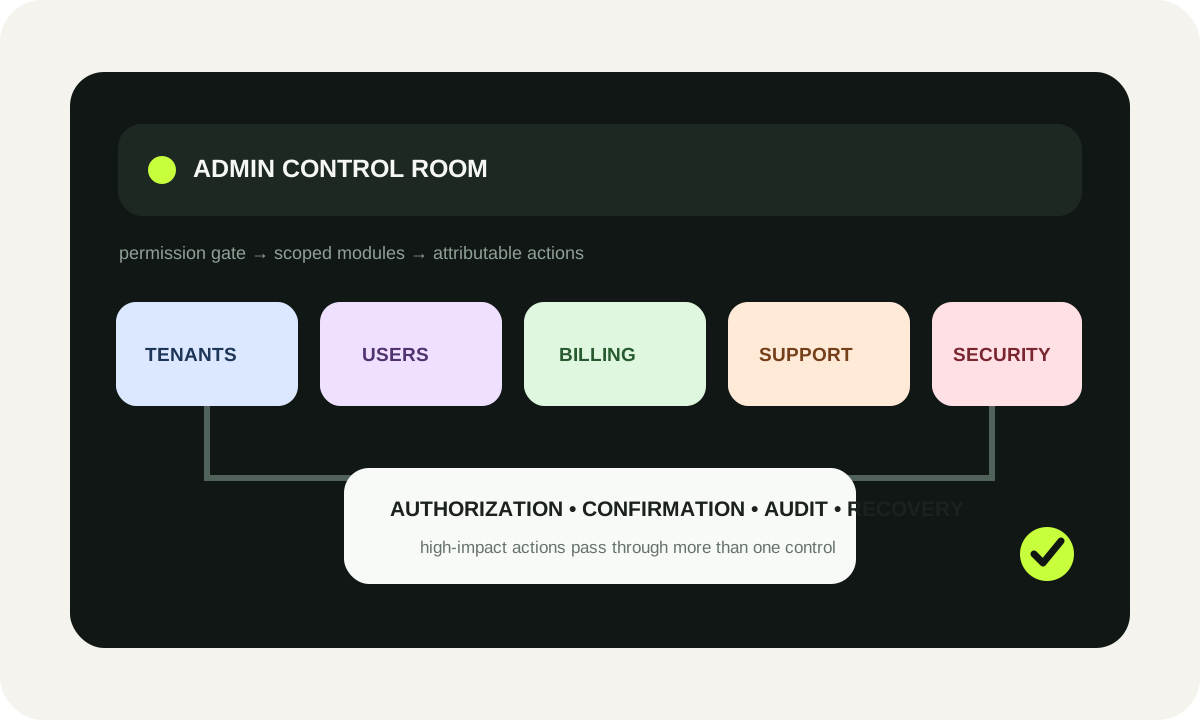
A strong SaaS admin dashboard combines persistent tenant context, users/roles, billing and entitlements, support tools, audit/security events, feature configuration, usage/limits visibility and proportionate safeguards for high-impact actions. Start from operator jobs and blast radius; add modules only when they make a real operational decision safer or faster.
Last reviewed: October 2, 2026Admin capability planner
Choose the jobs your internal team must perform. The planner maps those needs to modules, role-oriented permission views and destructive-action safeguards. Effort points are relative planning weights, not benchmark hours or prices. Inputs stay in this browser.
- Tenant / account overview — Product + Support; phase: Foundation.
- Usage, limits and account health — Product + Platform; phase: Scale.
- Users, roles and access — Security + Product; phase: Foundation.
- Plans, billing and entitlements — Billing + Product; phase: Operations.
- Audit logs and security events — Security + Platform; phase: Safety.
- Feature flags and configuration — Product + Platform; phase: Scale.
- Support agent: Read account overview; Read user membership.
- Billing admin: Read account overview; Manage plan; Review entitlements.
- Security admin: Manage roles; Review audit events; Manage sensitive configuration.
- Platform admin: Read all selected modules; Perform approved high-risk operations.
- Server-side authorization on every admin action
- Explicit confirmation showing tenant, target and effect
- Audit event with actor, target, reason and outcome
- Prefer reversible state changes or restore window
- Preview billing/entitlement impact before commit
1. Implementation roadmap by phase
Relative effort points are derived only from the modules selected above.
Takeaway: build identity/account foundations before layering operational workflows, safety evidence and scale controls.
2. Role permission surface
Number of permission groups exposed to each generated operational role.
Text fallback: Support agent 2, Billing admin 3, Security admin 3, Platform admin 2
3. Safeguard coverage by control type
The planner groups selected controls into authorization, confirmation, audit and recovery.
Takeaway: high-impact admin actions should not depend on a confirmation modal alone; combine authorization, evidence and recovery.
Source/assumption note: the module map and effort points are WebDesignK planning logic, not market benchmarks. Authorization and logging guidance should be validated against your architecture, security model and current authoritative standards.
Tables built for the buying decision
Primary decision table
| Decision | Option | Benefit | Tradeoff | Effort | Best fit |
|---|---|---|---|---|---|
| Admin scope | One universal super-admin surface | Fast to prototype | Large blast radius; hard to apply least privilege | Low initial / high governance debt | Small internal prototype only |
| Admin scope | Role-oriented modules | Clearer least privilege and workflows | Needs permission model and role engineering | Medium | Growing SaaS teams |
| Billing access | Expose provider dashboard links only | Minimal internal build | Context switching and weak product-state visibility | Low | Early stage with few support cases |
| Billing access | Unified billing + entitlement view | Faster diagnosis and clearer source-of-truth state | Requires sync/error modeling | Medium–high | Subscription products with support volume |
| Support | Full impersonation | Powerful reproduction capability | High privilege and audit risk | Medium | Only with strict safeguards |
| Support | Scoped view-as/support session | Lower write risk and clearer boundaries | May not reproduce every issue | Medium | Most support teams |
| Destructive actions | Single confirmation modal | Simple UX | Weak protection for irreversible/high-impact operations | Low | Low-impact reversible actions |
| Destructive actions | Preview + re-auth/approval + audit + recovery | Lower blast radius and better evidence | More implementation and operator friction | Medium–high | High-impact production actions |
Admin implementation checklist
| Owner | Evidence | Status |
|---|---|---|
| Product / Support | Top recurring operator jobs, escalation paths and account context fields are documented. | Plan |
| Security | Role-permission matrix plus server-side allow/deny tests exist for sensitive actions. | Plan |
| Billing / Product | Subscription source, entitlement source and synchronization/error states are mapped. | Plan |
| Platform | Audit event schema identifies actor, tenant, target, action and outcome. | Plan |
| Support / Security | Impersonation or view-as flow has reason, visible session state and start/end evidence. | Plan |
| Product / Platform | Feature flag and override scopes are defined with owner/expiry where applicable. | Plan |
| Engineering | Bulk/destructive operations have preview, partial-failure handling and recovery behavior. | Plan |
| QA / Security | Desktop/mobile, keyboard, denied-permission and cross-tenant boundary tests are recorded. | Plan |
Turn this planning result into a scoped review.
Send the assumptions, constraints and result summary. WebDesignK can review the architecture/content/implementation boundary, identify missing discovery inputs and return a prioritized next-step scope.
- Bring: current site/product, constraints, integrations and your tool result.
- You get: a scoped recommendation, open questions and implementation priorities.
Decision snapshot for SaaS admin dashboard design
A SaaS admin dashboard is worth prioritizing when internal operators can no longer support customers safely from database consoles, scattered vendor dashboards, one-off scripts and direct engineering help. The dashboard should not become a miniature copy of the customer product. It should be an operational control plane: account context, users and permissions, billing and entitlements, support tooling, audit evidence, configuration, usage limits and carefully guarded high-impact actions.
What you’ll learn / decide
- which operator jobs deserve first-class admin modules;
- how tenant context should frame every action;
- how to separate support, billing, security and platform permissions;
- when billing state and product entitlements need separate views;
- how to design support impersonation without making it invisible or casual;
- what an audit event must capture to be useful;
- how feature flags, limits and configuration fit into one control plane;
- how bulk and destructive actions should be previewed, confirmed, logged and recoverable;
- how to phase the implementation without inventing a giant “admin everything” project.
The most important tradeoff is operator speed versus blast radius. A dashboard should make common support work fast, but every shortcut increases the need for scoped authorization, clear tenant context, attributable actions and recovery paths.
1. Who the admin dashboard serves
Start with jobs, not screens. “Build an admin dashboard” is too broad because support, finance, security, customer success and engineering do not need the same authority. Interview operators around real incidents: a failed invitation, a locked account, an invoice dispute, a quota problem, a suspicious login, a feature rollout or an urgent customer escalation.
A useful first inventory is a list of operator decisions and the evidence each decision requires. Support may need account status, user membership, recent errors and a safe way to reproduce a customer problem. Finance may need subscription, invoice and entitlement state. Security may need role changes, authentication events and privileged-action history. Platform teams may need feature configuration, service health and limits.
Use role views instead of one “super admin” screen
NIST’s RBAC materials describe permissions as associated with roles rather than being administered separately for every individual. In a SaaS product, that translates into role-oriented admin surfaces and server-side checks. A support role should not inherit billing or security powers merely because the same page happens to display those controls.
OWASP’s authorization guidance reinforces least privilege and deny-by-default behavior. The user interface can hide actions a role cannot perform, but the API must enforce the same rule. Treat UI visibility as convenience; treat server-side authorization as the control.
The business trigger for prioritizing the dashboard
A dashboard becomes urgent when any of these conditions appear repeatedly:
- engineers are asked to run manual data fixes for routine support;
- customer-facing teams need database access to answer account questions;
- billing, entitlement and product state disagree and nobody has one authoritative view;
- privileged actions occur without a durable actor/reason/outcome trail;
- support agents share overly broad credentials;
- incident reviews cannot reconstruct who changed a tenant or user;
- high-volume accounts require repeated bulk operations that are currently handled with scripts.
Those are operational signals, not vanity-product signals. The admin dashboard is infrastructure for running the SaaS safely.
2. Tenant and account overview
Every admin workflow should begin with an unmistakable tenant/account context. The operator needs to know which customer they are looking at before seeing controls that can change customer state.
The account overview usually earns a place early because many other modules depend on it. It can include canonical account ID, display name, lifecycle status, plan, region, primary contacts, user count, key limits, support status and links into billing or observability. Avoid turning it into a data dump. Surface fields that change a decision.
Design against cross-tenant mistakes
Cross-tenant errors are a defining risk in multi-tenant administration. Make tenant context visually persistent while operators move between tabs. Include immutable identifiers where names may collide. For high-impact actions, repeat the target tenant and object in the confirmation step.
If the system supports account switching, the switch should reset stale selections, search state and action context. A bulk selection created inside one tenant should never silently survive a tenant change.
Inputs needed before implementation
Bring a real tenant model, not a screenshot mock. The team should have:
- account/tenant schema and lifecycle states;
- user-to-tenant membership rules;
- existing role/permission model;
- billing provider objects and internal subscription mapping;
- entitlement source of truth;
- support workflow and escalation policy;
- audit/event schema or logging pipeline;
- feature-flag/configuration sources;
- usage and limit definitions;
- retention and recovery rules for destructive changes.
If one of these is missing, the dashboard design should expose that architecture gap rather than inventing fake certainty.
3. Users, roles and access
User administration is not just a CRUD table. It combines identity, membership, role assignment, invitations, suspension, offboarding and sometimes organization-level policies.
A good user detail view answers: Who is this person? Which tenant(s) are they part of? What roles and permissions are effective? When did access change? Which authentication methods are configured? Are there open invitations or disabled sessions? Which actions can this operator safely perform?
Effective permissions matter more than role labels
A role named “Admin” is not enough evidence. If your system has role inheritance, custom permissions, organization policies or feature-specific access, show effective permissions or a trustworthy summary.
Role changes are high-value audit events. Record actor, target user, tenant, before/after role state, timestamp, reason when required, and the result. For elevated roles, consider step-up authentication or a second approver depending on your risk model.
Avoid authorization drift between dashboard and APIs
The dashboard should consume the same authorization decisions as the underlying APIs. Do not create a separate front-end permission matrix that slowly diverges from backend rules. Tests should exercise both allowed and denied cases for each sensitive action.
4. Plans, billing and entitlements
Billing state answers “what is the customer paying for?” Entitlement state answers “what can the customer use?” They are related but not identical.
Stripe’s Entitlements model is a useful current example: features can be attached to products, and active entitlements describe feature access for customers. Even if you do not use Stripe Entitlements, the separation is helpful. A SaaS admin screen should distinguish subscription/payment facts from product-access facts.
Show source and synchronization state
Billing problems become difficult when internal product state, billing provider state and entitlement state diverge. The dashboard should show the authoritative source and last synchronization result where relevant.
Useful questions include:
- Is the subscription active, paused, canceled or scheduled to change?
- Which plan/price is active?
- Which features or limits are currently entitled?
- Are there pending changes?
- Did the last billing/entitlement webhook succeed?
- Is access coming from a manual override?
- When will an override expire?
Do not give every support agent a “fix billing” button. Common recovery operations should be explicit, scoped and permissioned.
Preview changes before commit
Before a plan, quantity or entitlement change, show the intended effect. The preview should identify tenant, current state, proposed state and any downstream action. If the action calls a billing provider, distinguish a local preview from provider-confirmed final state.
5. Support and safe impersonation
Impersonation can shorten support resolution dramatically, but it is one of the easiest admin features to design dangerously. The safe version is not “log in as user.” It is a governed support session.
A support impersonation flow should answer:
- which operator started it;
- which tenant and user are targeted;
- why access is needed;
- when the session started and ended;
- whether sensitive areas are excluded;
- which actions are disabled while impersonating;
- how the operator exits immediately;
- which audit events were generated.
Make impersonation visible
The product should display an unmistakable banner or frame while the operator is acting as a user. Hidden impersonation creates both security and human-factors problems. The operator should never forget that actions are occurring in customer context.
For higher-risk products, prefer view-as or scoped support sessions over full write-capable impersonation. If write actions are necessary, consider reauthorization and separate evidence.
6. Audit logs and security events
An audit log is not a decorative activity feed. Its purpose is reconstruction: who did what, to which object, in which tenant, when, from what context, and with what result.
OWASP’s Logging Cheat Sheet recommends application logging for security-relevant events and specifically calls out higher-risk administrative actions, privilege changes, sensitive data access, data import/export and other security-sensitive operations.
Separate audit evidence from noisy diagnostics
Operational debug logs and security/audit trails can have different retention, access and integrity requirements. The admin UI should not assume that one giant log stream solves both.
A useful audit event often contains:
- event type and version;
- timestamp;
- actor ID and actor role;
- tenant/account ID;
- target object type and ID;
- action;
- before/after summary where safe;
- reason or ticket reference when required;
- success/failure outcome;
- request/correlation ID;
- privileged session or impersonation context.
Avoid logging secrets, tokens or full sensitive payloads. Evidence should be sufficient to reconstruct the action without becoming a second uncontrolled data store.
Make search and export deliberate
Operators may need filters by tenant, actor, action, date and object. Export should be permissioned and itself logged. For high-value records, tamper detection and restricted read access matter as much as capture.
7. Feature flags and configuration
Feature flags let teams change behavior without a new deployment. OpenFeature describes a vendor-neutral specification for feature flagging and the basic pattern of changing application behavior at runtime.
In an admin dashboard, configuration should be treated as production state, not a casual settings panel. Show scope clearly: global, environment, tenant, cohort or user. A flag that is safe globally may be dangerous when changed for one enterprise tenant without understanding dependencies.
Separate temporary flags from durable entitlements
A product entitlement answers whether an account has access to a feature. A rollout flag answers whether a feature is enabled for a release or experiment. Mixing them creates confusing support states.
The admin view should show why a feature is enabled: plan entitlement, global rollout, tenant override, support exception or experiment membership. Overrides should have owners and expiry where practical.
8. Usage, health and limits visibility
Support teams need enough operational context to answer “why is this account failing?” without opening five observability tools.
Useful signals can include quota consumption, limit configuration, recent job failures, integration status, API usage, storage, last successful sync and service-health indicators. The dashboard should distinguish customer-caused limits from product incidents.
Avoid false precision
Do not invent red/yellow/green “health scores” unless the score has a documented model. Show underlying facts first. “API usage 98% of monthly limit” is actionable. “Customer health 72” is not unless the organization can explain what 72 means.
Usage views should state period, unit and refresh time. If numbers are delayed, show that delay.
9. Bulk actions and destructive-action safeguards
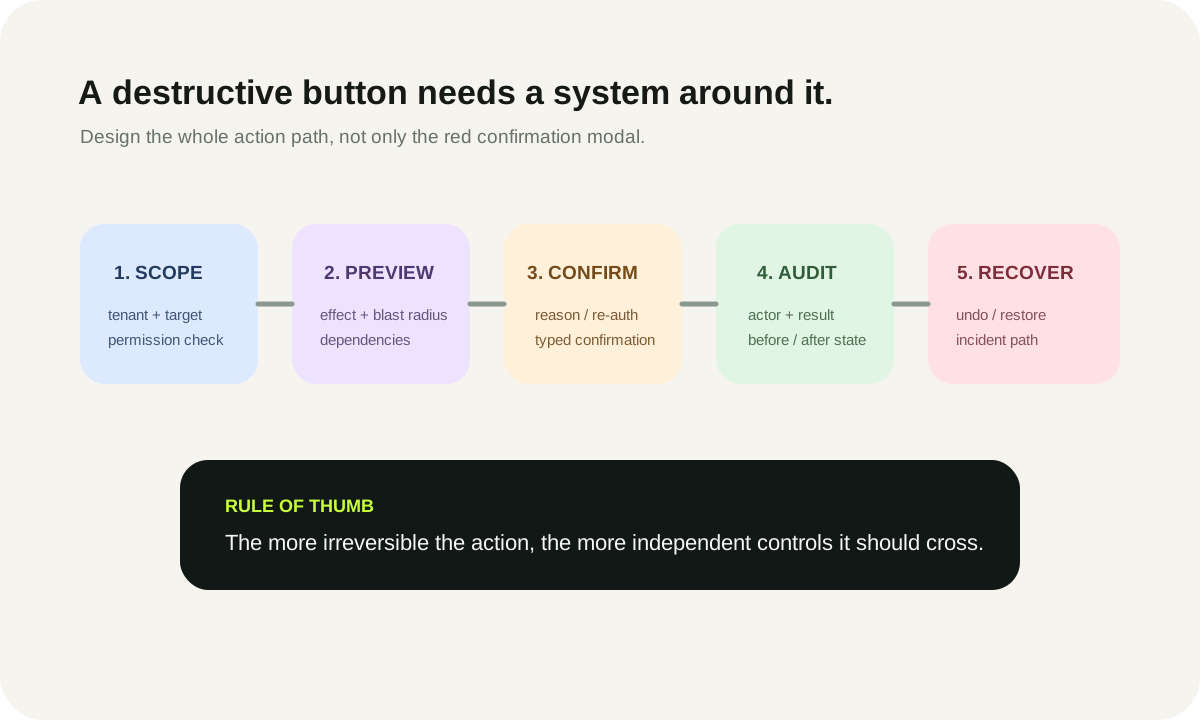
Bulk actions magnify both productivity and mistakes. A safe design treats selection, preview, confirmation, execution and recovery as separate steps.
The operator should know exactly how many objects are selected, whether selection spans pages or tenants, which items are ineligible, and what the operation will do. If a bulk action partially fails, return per-item results instead of hiding the failure behind a generic success toast.
A confirmation modal is not enough
For destructive or irreversible operations, combine controls:
- Authorization: the actor has explicit permission for this operation and scope.
- Preview: the UI states target, effect and blast radius.
- Confirmation: the operator performs a deliberate confirmation; high-risk actions may require re-authentication, typed confirmation or additional approval.
- Audit: the event records actor, target, reason and result.
- Recovery: prefer soft delete, restore windows, versioning or compensating actions where feasible.
The exact control set depends on the consequence. Deleting a test webhook endpoint is not the same as deleting a production tenant.
Three expensive failure modes
Failure mode 1: the admin UI becomes a universal backdoor. Detect it by comparing role permissions with API authorization and looking for actions that only rely on front-end hiding.
Failure mode 2: operators cannot tell which tenant they are changing. Detect it in usability testing by asking someone to perform the same action across several similarly named accounts.
Failure mode 3: changes are fast but not reconstructable. Detect it with a tabletop exercise: choose a privileged action from last week and ask who did it, why, what changed and whether it can be reversed.
10. Admin UX acceptance checklist
The dashboard is ready when an operator can complete frequent jobs without developer access, while a security reviewer can explain the permission and evidence path.
Tenant and navigation
- Persistent tenant/account context is visible on every scoped screen.
- IDs and environment labels prevent ambiguity.
- Tenant switching clears stale selections and action state.
- Search results cannot expose unauthorized tenants.
Access
- Every action is enforced server-side.
- Role-specific navigation reduces clutter without becoming the authorization boundary.
- Sensitive role changes are audited.
- Denied actions fail predictably and do not leak data.
Billing and support
- Subscription facts and entitlement facts are distinguishable.
- Overrides show source, owner and expiry where relevant.
- Impersonation requires a reason, is visibly marked and creates start/end audit records.
- Support users cannot silently cross into unrelated privileged functions.
Security and operations
- Audit records capture actor, target, tenant, action and result.
- High-risk configuration changes are attributable.
- Limits show unit, period and freshness.
- Bulk actions preview the selected scope and return partial failures clearly.
- Destructive actions use safeguards proportionate to impact.
- Recovery paths are documented and tested.
Measure the dashboard after launch
Use leading indicators that describe operations, not vanity adoption:
- percentage of routine support jobs completed without engineering intervention;
- time to find authoritative tenant/user/billing context;
- percentage of privileged actions with complete audit evidence;
- number of manual scripts still used for recurring operations;
- denied/failed admin actions caused by unclear permissions;
- restore/recovery success for reversible destructive actions.
Review the dashboard on a cadence tied to product change. New billing models, identity providers, roles, feature-flag systems and enterprise controls can make the admin surface stale quickly.
Implementation sequence
A practical sequence is:
Foundation: tenant context, user/access model, shared authorization helpers and audit event shape.
Operations: billing/entitlements, support workflows, safe customer context and the most common account fixes.
Safety: privileged-action evidence, destructive safeguards, impersonation controls and incident-focused audit views.
Scale: feature configuration, limits, richer health signals, bulk operations and advanced search.
Use the interactive planner above to change the module map based on your actual operator jobs. The roadmap chart uses only relative planning points from your selections; it is not a delivery estimate.
If you need help converting an operator workflow inventory into a secure admin control plane, see custom SaaS development. You can also continue with multi-tenant SaaS architecture, how long SaaS development takes, and a practical SaaS conversion framework.
Last reviewed: October 2, 2026. Security guidance, platform capabilities and vendor APIs change; verify current official documentation before implementing privileged controls.
Frequently asked questions
What should be on a SaaS admin dashboard?
Only the internal capabilities needed to operate the product safely: tenant/account context, user and role administration, billing/entitlements, support tools, audit/security events, feature configuration, usage/limits, and guarded operational actions. The exact set should follow operator jobs and permissions.
Should support agents have super-admin access?
Usually no. Give support the minimum permissions needed for support workflows and enforce them server-side. Separate billing, security and platform powers into role-oriented permissions rather than relying on a single broad admin role.
Is impersonation safe for customer support?
It can be useful but should be treated as a privileged support session: require authorization and a reason, make the session visibly different, limit sensitive actions, record start/end events and keep a clear exit path. In many products a scoped view-as mode is safer than full impersonation.
What is the difference between billing and entitlements?
Billing describes commercial/subscription state; entitlements describe which product capabilities the customer can use. They can diverge because of pending changes, overrides, synchronization failures or product-specific access rules, so admin tooling should make the distinction visible.
What should an admin audit log record?
At minimum, enough context to reconstruct the event: timestamp, actor, actor role, tenant/account, target object, action and result. Sensitive operations may also need reason, before/after summary, request/correlation ID and privileged-session context. Avoid copying secrets or unnecessary sensitive payloads into logs.
How should destructive admin actions be designed?
Match controls to impact. Combine server-side authorization, clear target/effect preview, deliberate confirmation, audit evidence and a recovery path where feasible. Elevated irreversible actions may justify step-up authentication, typed confirmation or second-person approval.
Sources and assumption boundaries
Fast-changing platform, pricing and search claims were reviewed on October 2, 2026. Interactive scores and scenarios are clearly labeled planning models, not sourced market benchmarks.
- NIST Role Based Access Control Authoritative background on RBAC, role/permission relationships and current INCITS 359-2012 reference.
- OWASP Authorization Cheat Sheet Least-privilege, deny-by-default and authorization design guidance used for privileged admin actions.
- OWASP Logging Cheat Sheet Application/security logging guidance, including administrative actions, authorization events and audit-trail considerations.
- Stripe Entitlements API Current first-party example of modeling product features and customer active entitlements separately from subscription state.
- OpenFeature Specification Vendor-neutral feature-flag specification and terminology for runtime configuration.