Quick answer
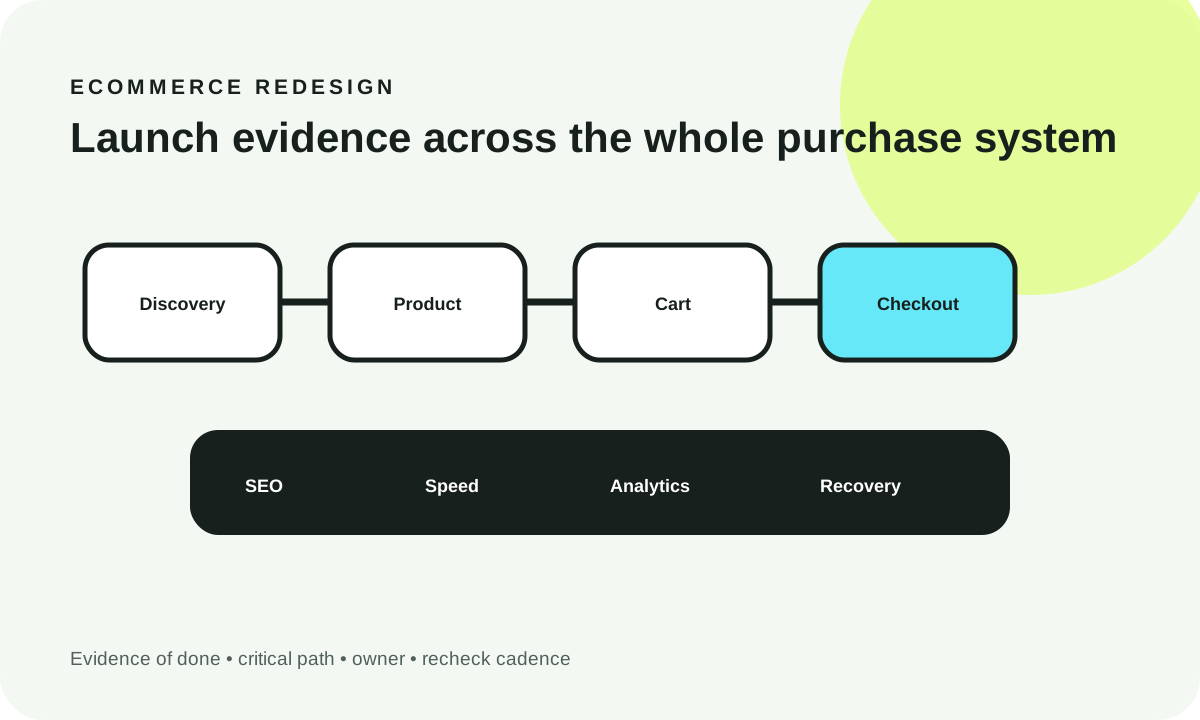
Protect five systems together: shopping experience, order execution, search continuity, measurement continuity and operational recovery. Close Critical items with inspectable evidence, then use the category and phase views to find gaps. A high percentage alone is not a launch gate.
Last reviewed: 2026-10-07T00:00:00.000ZEcommerce redesign evidence checklist
Use this as a release-control worksheet across UX, checkout, technical, SEO, analytics and security work. Mark a row complete only when the named evidence exists. Progress is browser-local and is not a revenue, conversion or ranking prediction.
| Status | Check | Category | Severity | Owner | Evidence of done | Recheck cadence |
|---|---|---|---|---|---|---|
| Capture pre-launch orders, revenue, funnel and error baselines using the same reporting definitions you will use after launch | Analytics | Critical | Data | Dated baseline dashboard/export with metric definitions and comparison window | Preflight; repeat before material releases | |
| Inventory current product, category, editorial, campaign and utility URLs before changing information architecture | SEO | Critical | SEO | Crawl/export with current status, canonical, indexability, traffic role and planned disposition | Once per redesign; update for late URL changes | |
| Map every changed high-value URL to the most relevant new destination and test direct permanent redirects | SEO | Critical | SEO | Old-to-new mapping plus automated response sample showing direct redirect and final 200 destination | Launch; sample for 30 days | |
| Define canonical behavior for products, variants, categories, pagination and duplicate/sort/filter states | SEO | Critical | SEO | Rendered canonical samples across representative URL families plus crawl comparison | Launch and template/routing changes | |
| Decide which faceted-navigation URLs can be crawled/indexed and prevent uncontrolled URL-space expansion | SEO | High | SEO | Facet parameter policy, crawl sample and internal-link behavior for indexable versus non-indexable states | Launch and filter changes | |
| Generate sitemaps from canonical indexable URLs only and verify production host/status | SEO | High | SEO | Production sitemap sample reconciled against canonical crawl | Launch; monthly sample | |
| Validate ecommerce structured data against visible product/offer content and current eligibility | SEO | High | SEO | Representative product validation output plus source-to-render field mapping | Launch and product-template changes | |
| Confirm category, collection and product navigation matches shopper tasks rather than internal merchandising labels only | UX | High | Design | Task-based navigation walkthrough on mobile and desktop with representative catalog | Preflight; quarterly research | |
| Test onsite search for exact products, common terms, misspellings, no-results and unavailable items | UX | High | Design | Search test matrix with expected/actual results and no-results recovery behavior | Launch; monthly query review | |
| Verify filters and sorting preserve usable state, keyboard/mobile operation and intentional URL behavior | UX | High | Design | Mobile/keyboard walkthrough plus sampled filter URL/canonical/indexation checks | Launch and filter changes | |
| Preserve essential product facts, variant availability, shipping/returns context and trust evidence during redesign | Strategy | High | Marketing | Content parity sheet for representative top-selling/high-traffic products | Preflight; content releases | |
| Keep category pages useful for shopping and discovery instead of replacing product context with decorative content | Strategy | Medium | Marketing | Representative category review covering title, intro/helpful context, products, filters and links | Preflight; seasonal changes | |
| Document promotion, coupon, bundle, gift-card and price-display rules before checkout QA | Strategy | High | Marketing | Promotion matrix with eligibility, stacking, expiration and expected cart/checkout behavior | Each promotion engine change | |
| Complete product selection, variant choice, quantity and add-to-cart on a narrow mobile viewport without hidden controls or overflow | UX | Critical | Design | 390px recording/screenshots of representative PDP tasks including error and unavailable states | Each PDP release | |
| Complete product discovery and add-to-cart with keyboard-only interaction and visible focus | UX | High | Design | Keyboard walkthrough covering menus, filters, variants, quantity, modal/drawer and add-to-cart | Each major UX release | |
| Verify cart quantity, remove, saved state, promotions, shipping threshold messaging and totals remain consistent | Checkout | Critical | Engineering | Cart scenario matrix with server/order-state evidence for each mutation | Each checkout/cart release | |
| Confirm the intended guest/account checkout paths work and do not introduce unintended account barriers | Checkout | Critical | Design | End-to-end guest and account checkout recordings for supported paths | Each checkout release | |
| Validate shipping methods, rates, address states and delivery promises against configured business rules | Checkout | Critical | Engineering | Test orders covering representative regions, shipping methods and unavailable cases | Each shipping/rate change | |
| Validate displayed tax behavior and order totals for representative configured markets without inferring legal tax obligations | Checkout | Critical | Engineering | Test-order reconciliation against the configured tax provider/rules for representative cases | Each tax configuration/provider change | |
| Run authorized payment-provider test flows for success, decline/cancel, retry and duplicate-submit protection | Checkout | Critical | Engineering | Provider test transaction IDs plus order-state screenshots/logs for each supported path | Each payment/checkout release | |
| Ensure purchase success appears only after confirmed order creation and exposes the expected order reference | Checkout | Critical | Engineering | Successful test order traced from browser to order system and confirmation surface | Each checkout release | |
| Prevent duplicate purchase measurement by using stable transaction identifiers and validating retry/refresh behavior | Analytics | Critical | Data | Analytics debug evidence showing one purchase for a test transaction across refresh/retry scenarios | Each ecommerce tracking change | |
| Validate agreed ecommerce events and required item/transaction parameters through product, cart, checkout and purchase | Analytics | Critical | Data | Debug/realtime event sequence for view_item, add_to_cart, begin_checkout and purchase with expected parameters | Each tracking/checkout release | |
| Define and test refund measurement when refunds are part of the analytics operating model | Analytics | Medium | Data | Test refund event with matching transaction reference and expected item-level fields where used | Tracking changes; quarterly sample | |
| Verify analytics and marketing tags follow the implemented consent/privacy policy in production | Analytics | Critical | Data | Tag/network evidence for relevant consent states plus documented owner for policy requirements | Launch; tag/consent changes | |
| Trace order/customer data to downstream fulfillment, CRM, ERP or notification systems where the redesign touches those paths | Technical | Critical | Engineering | Test order reconciled across every business-critical downstream destination | Each integration release | |
| Validate stock/availability updates and oversell prevention behavior for representative product states | Technical | Critical | Engineering | Inventory scenario tests for in-stock, low/out-of-stock and concurrent/cart edge cases supported by the stack | Each inventory/integration release | |
| Measure representative category, product, cart and checkout templates rather than only the homepage | Technical | High | Engineering | Production-like LCP/INP/CLS or lab proxy report by representative template and device class | Launch; monthly field review; major script/media changes | |
| Reserve image dimensions and deliver appropriately sized responsive media to reduce layout shift and transfer cost | Technical | High | Engineering | Network/layout inspection on representative catalog and product pages | Template/media pipeline changes | |
| Inventory third-party scripts/widgets and verify owners, business value, loading behavior and failure isolation | Technical | High | Engineering | Production request inventory with owner/purpose and disable/escalation path | Launch; monthly/tag changes | |
| Validate cache/CDN behavior does not serve stale price, inventory, cart or personalized state | Technical | Critical | Engineering | Cache-header and state-isolation tests for public versus user-specific responses | Each CDN/cache rule change | |
| Handle removed products/categories intentionally with relevant redirects, 404/410 outcomes or alternative discovery | SEO | High | SEO | Sample retired-URL test matrix with status, destination and internal-link cleanup | Launch; catalog removals | |
| Confirm production robots/indexability differs intentionally from staging and no launch-blocking noindex survives | SEO | Critical | SEO | Rendered meta/headers plus robots.txt and sampled production crawl | Every production launch | |
| Test checkout labels, errors, focus, keyboard operation, reflow and status messaging against the agreed accessibility scope | Security | Critical | Design | Manual keyboard/reflow/form-error evidence plus automated findings against agreed WCAG scope | Each checkout UX release | |
| Confirm sensitive payment/account data boundaries and third-party responsibilities match the implemented architecture | Security | Critical | Security | Current data-flow diagram, processor/payment boundary and named security review owner | Architecture/provider changes | |
| Review ecommerce admin roles, least-privilege access and vendor offboarding for production systems | Security | High | Security | Role/access review and removal plan for temporary/vendor accounts | Launch; quarterly; staffing changes | |
| Document deploy, rollback, database/order compatibility and the people authorized to execute recovery | Technical | Critical | Engineering | Release runbook with exact previous artifact/version and tested recovery steps where feasible | Every production release | |
| Monitor application errors, checkout/payment failures and integration failures from the first production session | Technical | Critical | Engineering | Live monitoring dashboard plus a test alert/error trace routed to an owner | Continuous; launch review | |
| Watch Search Console/crawl behavior and high-value organic landing pages against the saved pre-launch baseline | SEO | High | SEO | Day 1/7/14/30 comparison with documented investigated URL groups | Days 1, 7, 14, 30; then monthly | |
| Compare product-view, add-to-cart, checkout and purchase measurement continuity after launch before interpreting optimization lift | Analytics | Critical | Data | Day 1/7/14/30 funnel comparison plus event-volume/parameter anomaly checks | Days 1, 7, 14, 30 | |
| Reconcile analytics purchase totals against the commerce/order system before using analytics revenue for redesign conclusions | Analytics | Critical | Data | Dated reconciliation sample with known timing/refund/tax/shipping differences documented | Day 1/7/30 and after tracking changes | |
| Collect post-launch support/search/no-results/checkout friction signals and separate defects from optimization ideas | Strategy | Medium | Marketing | 30-day issue log labeled defect, data gap or optimization with owner and decision | Weekly for 30 days; then regular VOC cadence |
1. Overall evidence-backed completion
Takeaway: overall progress is useful only when checkout, data and search-critical blockers are also closed.
Text fallback: 0 of 42 checks complete; 0 of 24 critical checks complete.
2. Completion by category
Takeaway: uneven category progress exposes redesigns that look finished while checkout, SEO or analytics evidence is still incomplete.
Text fallback: Strategy 0/4; UX 0/5; Checkout 0/6; Technical 0/8; SEO 0/9; Analytics 0/7; Security 0/3.
3. Preflight, launch and post-launch coverage
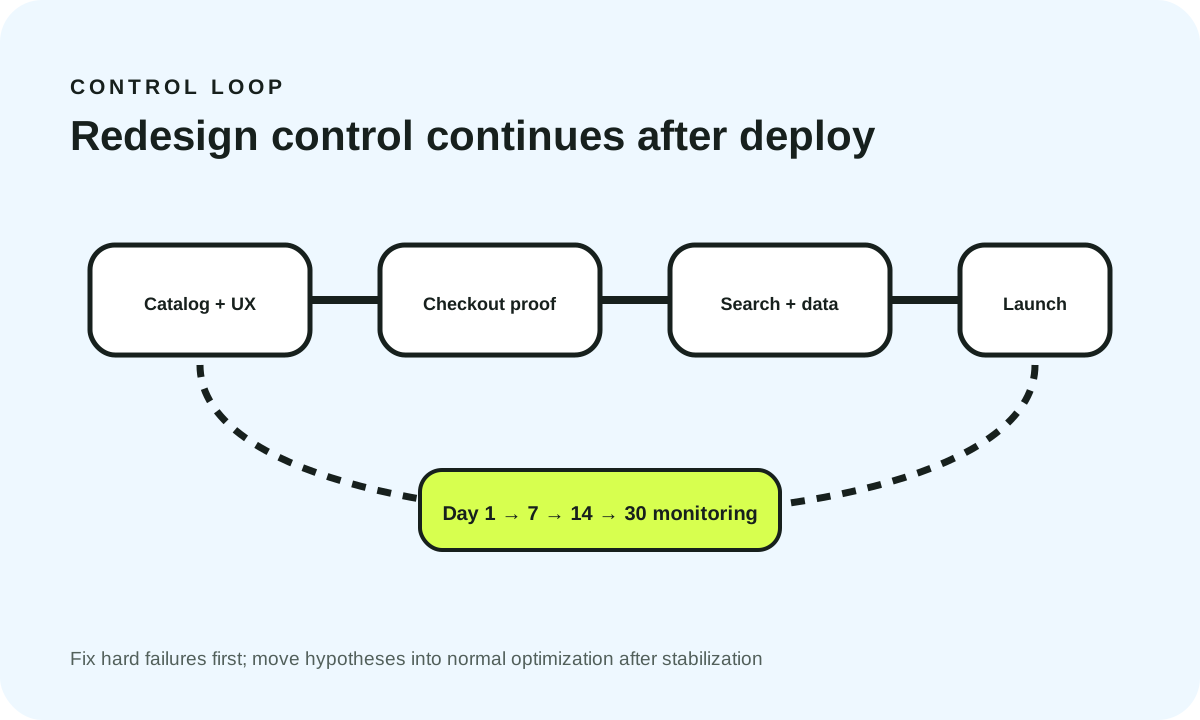
Takeaway: redesign control continues after deploy; monitoring and reconciliation are part of the launch system.
Text fallback: Preflight 0/11; Launch 0/24; Post-launch 0/7.
Source/assumption note: this is a WebDesignK editorial release-control framework informed by the cited Google Search, Google Analytics, web.dev and W3C guidance. Progress values come only from these 42checks and your browser-local completion state. They are not market benchmarks or promises of revenue, conversion or ranking change.
Tables built for the buying decision
Primary decision table
| Launch domain | What to validate | Evidence of done | Primary owner | Launch gate | Recheck |
|---|---|---|---|---|---|
| Catalog + UX | Navigation, onsite search, category filters, PDP variants, mobile/keyboard tasks | Task recordings + state screenshots for representative catalog paths | Design / Marketing | Block if shoppers cannot find/select intended products | Each major UX/catalog release |
| Cart + checkout | Cart mutations, promotions, shipping, tax config, payment paths, order confirmation | Test order/payment references + order-state reconciliation | Engineering | Block if order amount/state can be wrong or purchase cannot complete | Every checkout/payment release |
| SEO/indexation | URL inventory, redirects, canonicals, facets, sitemap, structured data | Pre/post crawl + sampled HTTP/canonical responses + validation output | SEO | Block on robots/noindex, major redirect/canonical or crawl architecture failures | Launch + days 1/7/14/30 |
| Performance | Category/PDP/cart/checkout LCP/INP/CLS and script/media regressions | Field data where available + production-like lab traces by template | Engineering | High; block when critical purchase interaction is unusable | Launch + monthly / major releases |
| Analytics | Ecommerce event sequence, parameters, transaction IDs, consent, order reconciliation | Debug/realtime sequence + transaction/order comparison | Data | Block if purchase measurement is lost/duplicated or cannot be reconciled | Launch + days 1/7/30 |
| Security/accessibility | Sensitive-data boundary, admin access, keyboard/focus/forms/reflow, third parties | Data-flow/access review + manual task evidence + automated findings | Security / Design | Block material security or critical-task accessibility failures | Launch + architecture/UX changes |
30-day ecommerce stabilization cadence
| Control | Day 1 | Days 2–7 | Days 8–14 | Days 15–30 |
|---|---|---|---|---|
| Orders/payments | Confirm order creation/payment state and failure monitoring | Review failure clusters and edge cases | Compare stable failure patterns | Close launch defects; hand recurring monitoring to operations |
| SEO | Robots/indexability/redirect smoke test | Crawl/Search Console + high-value URL groups | Compare indexed/click patterns to baseline | Document persistent URL-family issues and owners |
| Analytics | Validate ecommerce sequence and purchase deduplication | Review event volume/parameter anomalies | Segment funnel continuity by device/channel/template | Reconcile analytics revenue sample against order system |
| Performance | Check representative templates and hard regressions | Review field/lab signals and third-party changes | Prioritize persistent template regressions | Move remaining work into normal performance backlog |
| UX/support | Catch blocked product/cart/checkout tasks | Cluster support/search/no-results signals | Separate defects from optimization hypotheses | Close stabilization log and open evidence-backed experiments |
Turn this planning result into a scoped review.
Send the assumptions, constraints and result summary. WebDesignK can review the architecture/content/implementation boundary, identify missing discovery inputs and return a prioritized next-step scope.
- Bring: current site/product, constraints, integrations and your tool result.
- You get: a scoped recommendation, open questions and implementation priorities.
An ecommerce redesign is ready to launch only when the team can prove that shoppers can discover products, choose variants, add to cart, complete checkout, receive a real order, and be measured correctly—without losing search signals or introducing hidden mobile, performance, accessibility, privacy or operational failures. Treat the redesign as a controlled commerce migration, not a visual refresh.
What you'll learn / decide
- which ecommerce redesign checks can block launch;
- what evidence proves checkout, SEO, performance and analytics are actually working;
- who should own each control across marketing, design, engineering, SEO, data and security;
- how to separate one-time launch checks from recurring post-launch controls;
- what to monitor on days 1, 7, 14 and 30 without pretending normal variation is caused by the redesign;
- how to use the interactive checklist above as a shared release artifact.
Last reviewed: October 7, 2026. Search, analytics, accessibility and browser-performance guidance changes over time, so re-check current primary documentation before a major relaunch.
Decision snapshot for Ecommerce Redesign Checklist
The safest ecommerce redesign protects five systems at once: shopping experience, order execution, search continuity, measurement continuity and operational recovery. A redesign can look finished while one of those systems is broken.
The most important tradeoff is launch speed versus evidence and reversibility. You do not need every medium-priority polish item closed, but you do need explicit evidence for revenue, search, analytics, security/accessibility and rollback-critical controls. If a remaining defect can lose orders, corrupt measurement, break indexation or prevent recovery, it belongs on the launch path.
Use the checklist above to filter Critical items, review category gaps and track only evidence-backed completion. The three progress views are intentionally derived from your checklist state—not from benchmark data or predicted uplift.
How to use the checklist and define done
A checklist is useful only when “done” means something another person can inspect.
For this guide, a row is complete when the named evidence exists. Examples include a test order ID, a payment-provider test transaction, an old-to-new URL map plus sampled HTTP responses, rendered canonical and robots evidence, a GA4 debug/realtime event sequence, a keyboard/reflow checkout walkthrough, a Core Web Vitals report for representative templates, a release runbook with the previous deploy artifact, or a monitoring alert routed to a named owner.
“Looks good,” “SEO checked,” “analytics installed” and “checkout works” are status labels, not evidence.
Keep one shared release artifact
The checklist should live with the release ticket, migration plan or launch runbook. If design has one spreadsheet, SEO another and engineering a separate launch note, nobody has a trustworthy go/no-go state.
The interactive tool stores progress only in the current browser. Use Copy summary or Print / export when you need to move the state into the system your team actually uses.
Do not turn the percentage into a launch score
A store at 95% can still be unsafe if the remaining checks include payment confirmation, transaction IDs, redirects or production robots directives. Use the overall percentage as navigation. Use Critical checks as a gate.
Critical preflight checks
Preflight protects decisions that become expensive once customer traffic hits the new stack.
Start with the production boundaries: public hostname and TLS, DNS/CDN ownership, production environment configuration, payment-provider modes and credentials, order/inventory integrations, tax/shipping configuration, consent/tag configuration, robots/indexability defaults, URL migration plan, analytics event contract, monitoring and rollback ownership.
Freeze decisions that affect multiple teams
Late changes to category URLs, product variants, checkout fields, shipping logic or tag/consent behavior can invalidate work across SEO, engineering, analytics and QA.
Before launch week, name a decision owner for each cross-functional rule and document what change requires re-testing.
Establish a before-state
Capture important organic landing pages, indexable product/category URLs, current redirects, purchase funnel definitions, orders/revenue reporting definitions, payment failure/error baselines, representative Core Web Vitals, top onsite-search queries, support themes and no-results patterns.
A baseline is not a promise that the redesign will improve a metric. It is the reference that lets you tell a broken instrument from a real customer change.
Strategy and content checks
A redesign should preserve the commercial information that helps someone choose.
For representative product and category templates, inventory product title and identifiers, variant options, availability, price/promotion context, delivery/shipping context, returns information, specifications, images/video, ratings/reviews where used, trust/support information, related products and structured content used by feeds or integrations.
Protect intent, not just copy
A category page is not merely a grid. It may be the place where customers understand the range, narrow choices and move into a product family.
A product page is not merely a hero image. It has to answer selection questions, expose constraints and support the configured purchase path.
During content migration, compare the old and new page at the level of shopping decisions, not paragraph count.
Promotion rules need QA data
Document coupons, bundles, gift cards, sale prices, member pricing and promotion stacking before the final checkout test.
For each promotion type, identify eligibility, expiration, stacking, cart display, checkout display, order-system representation and analytics parameters if relevant. This prevents design QA from passing a checkout that calculates the wrong commercial result.
UX and conversion checks
Ecommerce redesign QA should follow tasks, not components. Test discovery through purchase on narrow mobile, desktop and keyboard-only paths.
Product discovery
Check navigation, onsite search, category pagination/infinite loading, filters, sorting, no-results recovery, unavailable products, discontinued products and related recommendations where used.
Google's current ecommerce URL guidance recommends consistent URL patterns, self-referencing canonicals on indexable pages and crawlable anchor links. Faceted navigation can create very large URL spaces, so filter UX and crawl/indexation policy need to be designed together rather than by separate teams.
Product detail
On representative products, verify variant selection, stock state, quantity, price, promotion, shipping context, image gallery, meaningful alt text, add-to-cart confirmation, sticky mobile purchase controls if used, disabled/unavailable variants, and error/retry states.
A control existing in the DOM is not enough. It must be visible, reachable and understandable at the actual mobile viewport.
Cart
Change quantities, remove items, apply promotions and revisit the cart. Confirm totals remain consistent across UI and order state. Test stale or unavailable inventory behavior rather than assuming every cart reaches checkout unchanged.
Conversion evidence
For each step, capture the result that proves success. An add-to-cart check can require the expected UI state, correct cart line, matching product/variant identifier and the expected analytics event/item parameters. That makes UX and data QA share the same customer action.
Technical/performance checks
Do not evaluate ecommerce performance from the homepage alone.
Choose representative category/search, image-heavy product page, product with variants, cart, checkout and post-purchase confirmation templates.
Core Web Vitals currently use LCP, INP and CLS. web.dev recommends evaluating field performance at the 75th percentile and distinguishes field measurement from lab diagnostics. Lighthouse can help identify lab regressions, but it cannot measure real-user INP during a synthetic page load; use field data when available and lab traces as diagnostic evidence.
Common redesign regressions
Look for oversized product media, missing image dimensions, late injected banners, client-side variant logic that blocks interaction, large tag-manager payloads, third-party chat/review/personalization scripts, duplicate libraries, unstable sticky elements, expensive carousels, unnecessary hydration and cache rules that accidentally touch cart or personalized data.
A performance budget should be tied to representative templates and the actual production script/media stack.
Cache and state isolation
Ecommerce caching requires clear boundaries. Public catalog content and static media often benefit from caching. Cart, account, price/inventory contexts and personalized responses may have different rules.
Your launch evidence should show that CDN/cache behavior cannot leak or stale user-specific/order-critical state.
SEO and indexation checks
An ecommerce redesign can change more URLs than the team notices because categories, products, variants, filters, pagination and internal links all participate.
Preserve intentional URL families
Before launch, classify each important old URL: preserve, redirect to an equivalent new URL, consolidate, retire with an intentional 404/410 outcome, or temporarily hold because content is not ready.
Do not create a catch-all redirect to the homepage.
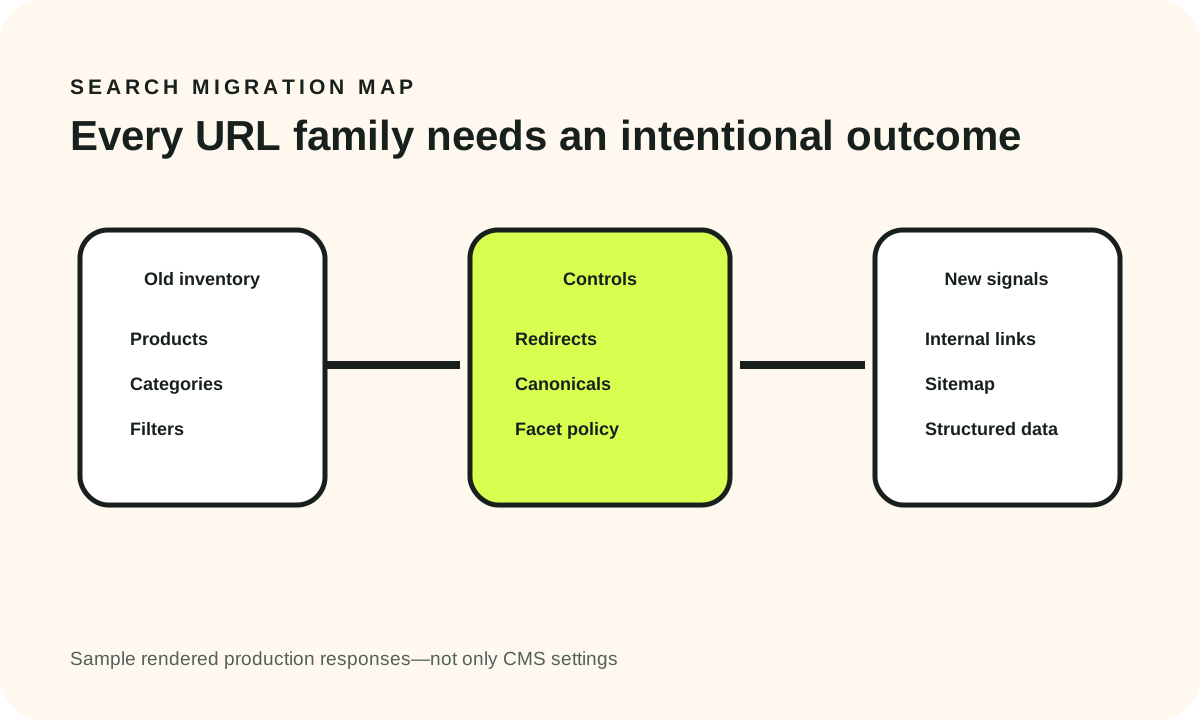
Google treats redirects and rel="canonical" as strong canonical signals and sitemap inclusion as a weaker signal. For a redesign, the operational objective is consistency: internal links, canonical annotations, sitemap membership and redirects should describe the intended architecture.
Product variants and canonicals
If product variants have their own URLs, decide which variant URLs are independently useful and which should consolidate.
Google's ecommerce URL guidance discusses using canonical product URLs for variant pages. The correct implementation depends on your catalog and page content, so test representative variants rather than relying on one global rule.
Faceted navigation
Filters can generate huge URL spaces. Google's current faceted-navigation guidance warns that parameter-based facets can lead to overcrawling and slower discovery of useful URLs. Decide which filtered states deserve crawl/indexation and make the rest intentionally controlled.
Structured product data
Google documents ecommerce structured data as a way to provide machine-readable page information, while only a subset of schema.org types/features are supported by Google.
Validate markup against visible production content and current eligibility. Do not keep offer/review/product facts in markup after the visible page or data source changed.
Search launch packet
Keep a pre-launch crawl, URL disposition map, redirect map, canonical rules, sitemap URL, structured-data samples, production crawl, Search Console owner and day 1/7/14/30 comparison. This turns search loss into a diagnosable set of URL families instead of a general panic.
Analytics/measurement checks
Measurement is a dependency of the redesign, not a tag installed after launch.
Google Analytics currently recommends ecommerce events including view_item, add_to_cart, begin_checkout, add_shipping_info, add_payment_info, purchase, refund and related events. Google also notes that ecommerce events are not automatically collected in general; they must be implemented with the expected event and item context.
Test a sequence, not isolated events
For a test purchase, capture the intended chain: product view, add to cart, cart view if used, begin checkout, shipping information, payment information and purchase.
You may not need every optional event, but events you do use should have stable meaning and the parameters required by your reporting design.
Purchase deduplication
A purchase should not duplicate because the thank-you page refreshes or a browser retries a request. Use a stable transaction identifier and verify actual retry/refresh behavior with test data.
Reconcile against the order system
Do not declare analytics “correct” because purchase events appear.
Reconcile a sample of transaction IDs, gross/net definitions, tax/shipping treatment, refunds, currencies and order statuses. Analytics and commerce systems can legitimately differ in timing or definitions. Document those differences so the redesign is not blamed for a reporting-model mismatch.
Consent and destinations
Test production consent states and destination receipt. A browser event existing in a data layer does not prove it reached the intended analytics destination under the expected consent state.
Security/accessibility/compliance checks
This section is a release-control framework, not legal advice.
Payment and sensitive-data boundary
Document what the site handles directly versus what the payment provider or other processor handles.
The redesign team should know which data enters your application, which fields are hosted/tokenized by a provider, where order/customer data is stored, who can access production admin systems, where secrets live and which third parties execute on checkout/account pages.
Route compliance conclusions to qualified security/legal specialists for your architecture and jurisdiction.
Accessibility
W3C currently encourages use of the latest WCAG version; WCAG 2.2 is the current version referenced in this guide.
For core ecommerce tasks, manually verify keyboard operation, visible focus, accessible names/labels, error identification, status messages, modal/drawer behavior, zoom/reflow, target usability, image alternatives and meaningful order confirmation.
Automated testing can find classes of problems, but it cannot prove that a person can complete a real shopping task.
Third parties
A redesign often introduces review widgets, chat, personalization, marketing tags and payment helpers.
Maintain a production inventory with purpose, owner, pages loaded, data/consent dependency, failure behavior and removal/escalation path. That supports performance, privacy and incident response from one shared artifact.
Launch/handoff validation
A commerce release is not done when the deployment finishes. Run a smoke test on the public hostname.
Production smoke path
At minimum:
- category/search opens;
- product loads with correct state;
- variant can be selected;
- item adds to cart;
- cart mutates correctly;
- checkout begins;
- configured shipping/tax/payment behavior is exercised in an authorized test mode;
- order is created;
- confirmation matches the order;
- downstream systems receive the expected record;
- analytics receives the expected ecommerce sequence;
- monitoring sees the release without unexplained errors.
If real payment testing is not appropriate, use the payment provider's supported test/sandbox flow according to your architecture.
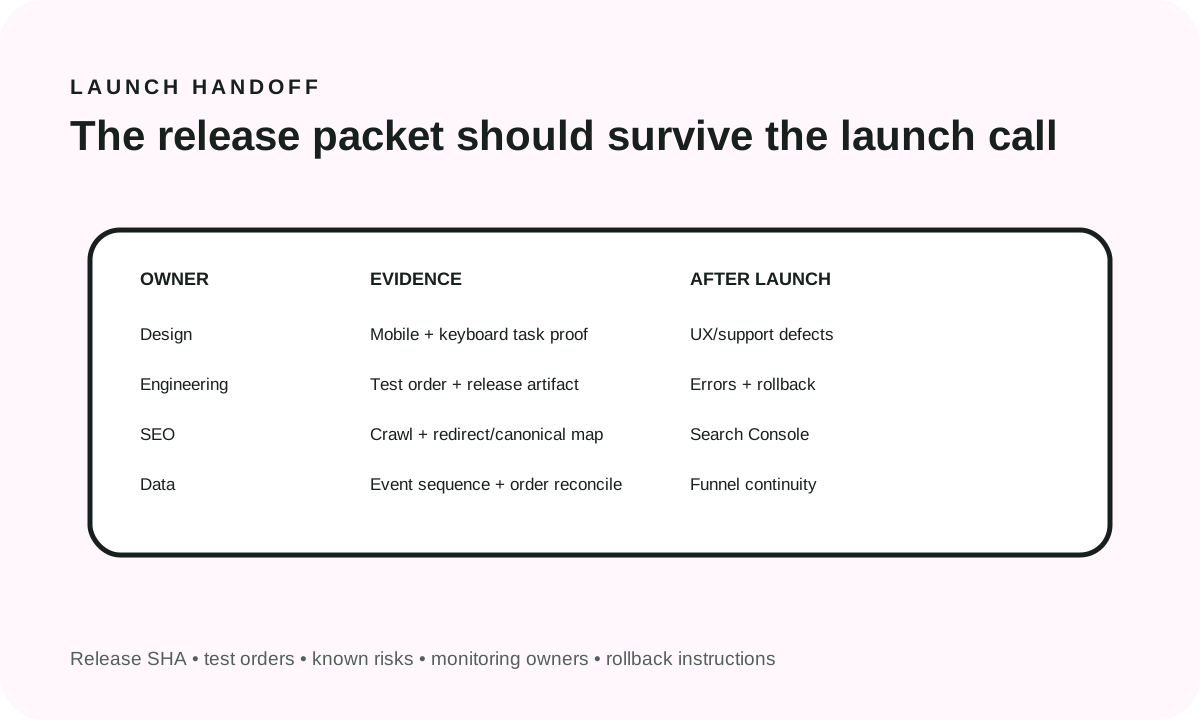
Handoff packet
Record the release SHA/version, public URL, old/new URL map, analytics event spec, test order IDs, known accepted risks, rollback instructions, monitoring owners, vendor/escalation contacts and next review dates.
A screenshot of the homepage is not a release packet.
Separate defects from optimization
A broken purchase event, invisible mobile selector or wrong redirect is a defect.
A new recommendation module, merchandising experiment or CTA test is optimization.
Do not mix them during stabilization or you lose the causal history needed to diagnose the redesign.
30-day post-launch monitoring
Plan the month before launch.
Day 1
Prioritize hard failure detection: uptime and application errors, payment/order failures, downstream integration failures, production robots/indexability, major redirect misses, analytics event loss or duplication, and obvious mobile/checkout regressions.
Days 2–7
Inspect high-value organic landing pages, Search Console/crawl behavior, product/category 404s, onsite-search/no-results, checkout funnel continuity, Core Web Vitals field signals where enough data exists, support contacts, promotion and shipping edge cases.
Days 8–14
Compare against the saved baseline and segment by device, channel, template and product/category family before drawing conclusions. Investigate persistent differences. Avoid rewriting the site in response to one noisy day.
Days 15–30
Complete the stabilization review across search/indexation, purchase funnel, analytics/order reconciliation, performance, accessibility defects, support feedback, integration reliability and open launch risks. Then close the redesign release and move remaining hypotheses into normal optimization work.
What not to claim
The redesign itself does not guarantee a conversion lift, revenue lift or ranking improvement.
Treat observed changes as signals that require segmentation and evidence. Product mix, promotions, media spend, seasonality, inventory, competitor activity and measurement changes can all move ecommerce outcomes.
That is why this checklist emphasizes continuity and evidence before optimization.
A compact ecommerce redesign release decision
A practical go/no-go decision asks:
Can shoppers complete the intended purchase path, can the business fulfill the resulting order, can search engines reach the intended canonical architecture, can the team trust the measurement, and can operations detect and recover from failure?
If the answer is yes with inspectable evidence, the redesign is operationally ready even if some lower-priority polish remains.
If any answer is unknown, the unknown belongs on the launch board with an owner.
WebDesignK can help turn this evidence into a scoped ecommerce implementation or redesign plan. Related guides include ecommerce conversion optimization, Shopify Plus vs custom ecommerce, and the broader website redesign launch checklist.
Source and legal boundary
This guide uses current primary guidance for areas that change: Google Search Central for ecommerce URL/canonical/faceted-navigation behavior, Google Analytics for ecommerce event definitions, web.dev for Core Web Vitals and W3C for WCAG 2.2.
The checklist categories, severity levels, owners and recheck cadences are WebDesignK editorial release controls. They are not legal obligations, industry benchmarks, platform guarantees or forecasts.
Payment, privacy, accessibility-law, tax and other compliance obligations depend on your architecture, market and jurisdiction. Use qualified specialists for legal/security conclusions.
Frequently asked questions
What should block an ecommerce redesign launch?
Payment/order failures, broken checkout, wrong order state, production robots/indexation mistakes, material redirect/canonical failures, unusable critical mobile/accessibility paths, lost/duplicated purchase measurement, or no safe recovery path can justify blocking launch.
How many checks should be complete before launch?
Do not use a universal percentage. Close every applicable Critical item with evidence and explicitly accept/own remaining risk. A 95% checklist can still be unsafe if the open item is payment or indexation.
Should ecommerce SEO checks include filters and variants?
Yes. Categories, product variants, pagination and faceted navigation can create duplicate or very large URL spaces. Define which states are useful/indexable and validate canonical/internal-link/sitemap behavior.
Which GA4 events matter for ecommerce redesign QA?
Use the ecommerce events your measurement design requires. Google currently recommends events such as view_item, add_to_cart, begin_checkout, add_shipping_info, add_payment_info, purchase and refund for online sales.
How should Core Web Vitals be used during redesign QA?
Measure representative ecommerce templates. Use field data where available for LCP, INP and CLS, and use lab traces to diagnose regressions before release. Do not treat one homepage Lighthouse score as the store's performance.
What should happen after day 30?
Close the redesign stabilization release, keep unresolved defects with owners, and move new merchandising/CRO hypotheses into the normal optimization backlog so launch defects and experiments do not share the same causal history.
Sources and assumption boundaries
Fast-changing platform, pricing and search claims were reviewed on 2026-10-07T00:00:00.000Z. Interactive scores and scenarios are clearly labeled planning models, not sourced market benchmarks.
- Google Search Central — Ecommerce URL structure Official ecommerce URL guidance covering consistent URLs, canonicals, variants and crawlable links. Reviewed October 7, 2026.
- Google Crawling Infrastructure — Faceted navigation Official guidance on crawl risks and controls for faceted-navigation URL spaces. Reviewed October 7, 2026.
- Google Search Central — Canonical URL methods Official canonicalization signals including redirects, rel=canonical and sitemap inclusion. Reviewed October 7, 2026.
- Google Search Central — Ecommerce structured data Official guidance on ecommerce-relevant structured data and supported Google Search features. Reviewed October 7, 2026.
- Google Analytics Help — Ecommerce setup Q&A Official ecommerce funnel guidance including begin_checkout, shipping, payment and purchase events. Reviewed October 7, 2026.
- Google Analytics Help — Recommended events Official online-sales event definitions for ecommerce measurement. Reviewed October 7, 2026.
- web.dev — Web Vitals Current Core Web Vitals definitions for LCP, INP and CLS and field-measurement guidance. Reviewed October 7, 2026.
- W3C WAI — WCAG 2 Overview Current W3C accessibility standards overview; W3C encourages use of the latest WCAG version. Reviewed October 7, 2026.